ReStory: Chill Electronics Repairs Workshop Customization
Paint the walls, shelve the spare trays, and decide when aesthetics beat bench speed.
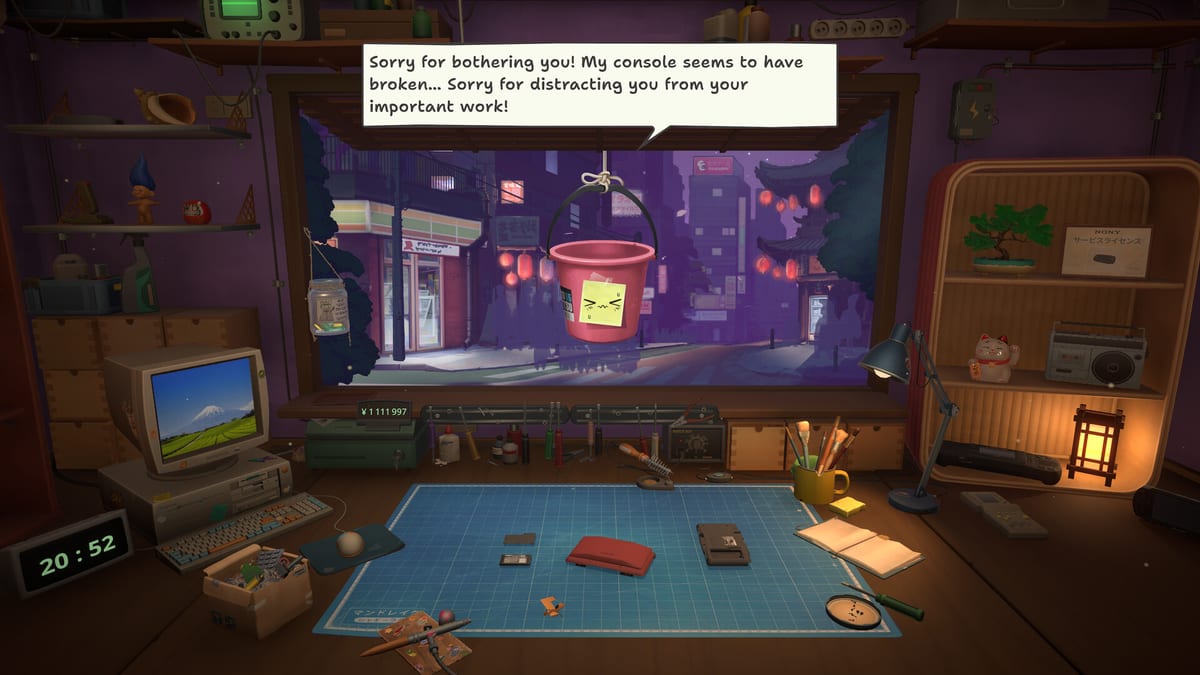
Your Akihabara-side street workshop in ReStory: Chill Electronics Repairs is both workplace and self-portrait. Mandragora lets you repaint walls, add shelving, hang lamps, and place cozy props—including cat figurines that nod to the game’s chill tone—while functional upgrades expand lighting, storage, and bench throughput elsewhere in the Tools tree. Customization does not change screw maps, but it shapes how neighbors describe your shop and how immersed you feel during long Nony PMP sessions. This guide separates cosmetic spending from survival upgrades and notes launch-era options tied to Reputation.
What customization includes
Launch content groups visual changes separately from license paperwork:
| Type | Examples | Effect |
|---|---|---|
| Wall paint | Color palettes, accent stripes | Visual only |
| Shelving | Spare part displays, tray racks | Organization flavor; pairs with storage upgrades |
| Lighting props | Desk lamps, neon accents | Ambience; functional lighting may stack |
| Decor | Cat props, posters, plants | Flavor; occasional bulletin reactions |
| Storefront | Shutter area, window dressing | Reputation flavor text |
Deep mechanical bench expansions live on Workshop upgrades—magnification, sandblasters, extra slots—not on the paint menu alone.
Paint walls and identity
Wall colors are the cheapest statement that you belong on this Tokyo side street. Mid-2000s palette choices lean warm wood tones, soft greens, and faded arcade posters—not cyberpunk neon unless you mod vibes through lamp props.
Practical advice:
- Repaint after your first rent cycle clears, not before Beginner tips emergency fund goals.
- Match palette to screenshot streams if you care about shareable cozy aesthetics.
- Remember paint does not unlock story flags—Kenji still shows up if walls stay default beige.
Some players sync colors with Story characters themes—soft blues near Yuri’s virtual pet arcs, retro oranges when Takashi’s Atari gear dominates the bench.
Shelving and spare part presentation
Shelving upgrades make your hoarded Pokia keypads and Eggotchi shells visible instead of abstract inventory rows. After the launch patch inventory filters, physical shelves still sell the fantasy of a cluttered real bench.
Prioritize shelving when:
- You farm Online orders and lose track of stock.
- Marketplace flips flood spare trays mid Shop growth.
- You want immersion without yet affording magnification lighting.
Shelving is cosmetic-mechanical hybrid: mostly flavor, but helps mental sorting during triple-device afternoons documented in Shop management.
Lamps, cat props, and cozy clutter
Desk lamps and cat props are pure vibe—excellent rewards after stressful Kazuo privacy jobs. Place them where camera default rests between customers so loading back from the Parts Browser feels welcoming.
Community screenshots often cluster cats near the CRT desktop—a joke about shop pets supervising email spam. No gameplay stat attaches; neighbors may comment during festival bulletin weeks, feeding Reputation flavor without hidden min-max.
Cosmetic vs functional priority
Use this order unless roleplaying a broke aesthetic purist:
- Functional lighting / magnification — Fewer mis-clicks on hinge clips; Upgrade priority.
- Electric screwdriver — Time is money in Shop economy.
- Storage slots — Workshop upgrades when queue overflows.
- Wall paint and decor — After one week’s rent buffer stable.
- Storefront polish — Before inviting screenshot tours or second playthrough pride.
Cosmetic-first runs are valid on repeat when mechanics are mastered—first timers should not paint before they can pay Hashimoto.
Launch customization notes
August 2026 release includes a baseline customization suite—not a empty shell waiting for DLC. Day-one patch notes focus on economy and QoL rather than new paint packs, but verify Updates if Mandragora adds seasonal decor later.
Customization menus sit alongside renovation prompts Hashimoto sometimes references—paying rent on time may unlock softer dialogue about improving the storefront, mirroring themes in Reputation without gating colors behind hidden flags.
Storefront reputation flavor
How the shop looks feeds neighborhood gossip separate from repair quality:
- Clean, lit storefronts correlate with positive off-screen reviews mentioned in return dialogue.
- Neglected shutters rarely hard-lock endings but reinforce ” struggling bench ” tone in Endings overview.
- Interactive clean prompts when available are free reputation—do them before buying cat number three.
Pair visual care with ethical repairs from Dialogue choices for the strongest community standing.
Customization and story beats
No major route requires a specific paint color. Grandma Chiyo cares about camera care, not mauve walls. Customization instead supports player attachment—the same reason ReStory earned Overwhelmingly Positive reviews for cozy pacing on Steam.
Second playthroughs often max decor early because bench skill removes economic fear—plan accordingly on run one.
Suggested progression
Run one: functional upgrades only until Shop growth chapter.
Mid run: one wall palette + lamp after electric screwdriver.
Late run / post-credits: cat props, full shelving glam, screenshot session.
Related guides
- Workshop upgrades — mechanical expansions
- Upgrade priority — spend order
- Shop management — reputation beyond paint
- Story characters — who notices your shop vibe
Customization is the reward layer atop ReStory’s repair sim—buy it when the bench already earns trust, not when rent is due tomorrow.
Frequently Asked Questions
Quick answers for ReStory players.
Does workshop paint affect gameplay stats?
Wall paint and most decor are cosmetic. Functional lighting, storage, and bench slots come from Workshop upgrades and tool unlocks instead.
Should I customize before buying tools?
Usually no. Prioritize electric screwdriver, magnification lighting, and rent buffer first. Cosmetics fit comfortably after the first stable week.
Do cat props or lamps unlock story scenes?
They are primarily flavor. Neighbors may comment on shop appearance, but major story routes depend on repairs and dialogue choices, not paint color.
Where are functional workshop upgrades?
Bench expansion, lighting, and storage live on the Workshop upgrades page under Tools—not the cosmetic paint menu alone.