ReStory: Chill Electronics Repairs How to Play ReStory
From opening the shutter to closing the books—your complete first-day framework.
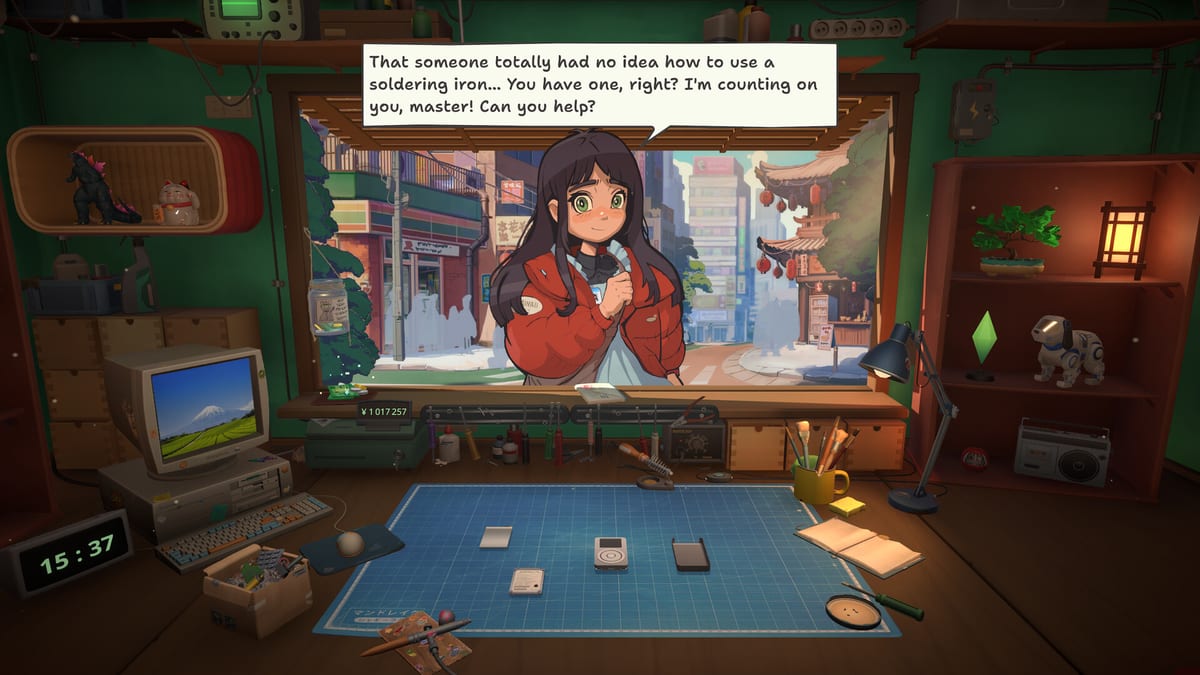
ReStory: Chill Electronics Repairs blends cozy shop management with hands-on gadget restoration in mid-2000s Tokyo. You are not racing a clock to bankruptcy, but every in-game day still asks you to balance repairs, conversations, and expenses. This guide explains the full loop so you know what to do when the street outside your workshop wakes up.
Core concept
You run a small repair bench where customers bring nostalgic hardware—Pokia phones, licensed Atari consoles, music players, cameras, Nony PMP handhelds, and virtual pets. Each job pays yen you reinvest into tools, licenses, spare parts, and rent. Story characters such as Kenji, Yuri, Takashi, Hana, Kazuo, and Grandma Chiyo appear as both customers and narrative anchors. Landlord Hashimoto reminds you that the building has bills. How you speak to people matters as much as how cleanly you solder a trace.
Start of day routine
When you begin a session, treat the shop like a real business opening checklist:
- Survey the bench — Clear finished devices if any remain from yesterday. An empty workspace reduces mis-clicks during delicate disassembly.
- Check email on your desktop — Remote repair requests arrive here. They are excellent early income when walk-in traffic is light.
- Review finances — Rent, utilities, and internet fees tick on a schedule. Skipping this step is how players stall mid-chapter despite busy repair queues.
- Stock common parts — Browse your Y2K browser briefly so you are not mid-repair when a capacitor or screen flex is out of stock. See How to Get Spare Parts for sourcing strategy.
The First Days walkthrough covers story beats tied to your opening Pokia repair; use this page for the repeatable daily skeleton.
Walk-in customers
When someone enters, the interaction usually follows four beats:
- Greeting and intake — Listen to the problem description. Note emotional cues; they foreshadow dialogue choices later.
- Accept or defer — Some devices need licenses you have not unlocked. Politely deferring beats accepting a job you cannot finish.
- Repair window — Move to the bench for teardown, cleaning, part replacement, soldering if required, and reassembly. Detailed steps live in How to Repair Devices.
- Return and conversation — Hand back the device and choose responses. Privacy ethics here can steer long-term story outcomes described in Endings.
Walk-ins often carry the richest narrative. Do not rush dialogue even when your bench backlog grows.
Online and email orders
Email jobs let you work asynchronously: accept the request, repair when ready, and ship or mark complete depending on the UI flow. They typically involve simpler hardware early on, which makes them ideal practice for screw counting and cleaning passes.
Online orders also teach the economy loop—parts cost money upfront, payment arrives on completion. If margin feels thin, compare salvage versus new parts before accepting low-paying listings.
The repair bench in context
Repairs are the heart of ReStory but not the only activity. Think of each day as alternating between bench time and shop time:
| Phase | Activities |
|---|---|
| Bench | Disassemble, brush boards, replace parts, solder, reassemble |
| Shop | Talk to customers, buy parts, pay bills, unlock licenses |
| Desktop | Email jobs, auctions, research for story clues |
Upgrade priorities—especially the electric screwdriver—are ranked in the Upgrade priority tier list. Faster screw removal means more jobs per day without skipping sleep in real life.
Licenses and device categories
Certain plot devices require official repair licenses. Story appointments with Takashi or Hana may arrive before you can legally open their hardware. Track requirements in How to Unlock Licenses and mirror progress on Tools unlocks.
The Devices catalog lists form factors you will eventually see: flip phones with fragile hinges, handhelds with custom screws, consoles with licensed shells you should not force.
Money, rent, and shop management
Income streams stack:
- Completed walk-in repairs
- Email and remote orders
- Flipping salvaged auction lots (higher risk, higher reward)
Expenses stack faster than newcomers expect:
- Rent to Hashimoto
- Utilities and connectivity
- Parts and tooling
- License fees
Shop management expands budgeting advice. A practical rule: keep one week’s rent in reserve before buying cosmetic upgrades.
Story progression without spoiling routes
Main beats trigger through specific customers and return visits—not by hitting arbitrary day counts. If Kenji or Yuri stops appearing, check whether an unfinished repair or harsh dialogue choice blocked the chain. The Story choices hub indexes character threads.
You do not need perfect repairs for every story beat, but returning a device late or gossiping about private data can close options. When unsure, choose responses that match how you want your shop to be known.
Controls and quality of life
Familiarize yourself with camera zoom, tool swap, and hint prompts listed on Controls. ReStory rewards patience: forcing panels breaks clips, and the screw counter exists because one missing fastener sends you back to partial teardown.
Suggested first-week schedule
Days 1–2: Complete tutorial repairs, accept easy email jobs, buy basic brushes, read Beginner Tips.
Days 3–5: Unlock your first license tier, salvage one donor device, upgrade toward an electric screwdriver.
Days 6+: Branch into story appointments, experiment with auction flips, read Dialogue Choices before major return conversations.
When you are stuck
If jobs pay less than parts, pause new accepts until salvage stock rebuilds. If reassembly fails repeatedly, use in-game hints and revisit How to Repair. If narrative stalls, finish pending character repairs before chasing random email listings.
ReStory is designed to feel meditative, not punitive. Learning the daily rhythm—open shop, triage customers, repair with intention, manage yen, speak carefully—turns the game from a scatter of mini-games into a satisfying Tokyo workshop sim worth replaying for different ethical outcomes.
Frequently Asked Questions
Quick answers for ReStory players.
What should I do first every in-game day in ReStory?
Check email for remote jobs, review rent and utilities, then greet walk-ins or continue bench work. Stock critical parts before accepting complex devices.
Are online email jobs worth doing early?
Yes. They provide steady income and simpler repairs while story walk-ins are gated. They also teach parts budgeting before license-locked hardware appears.
Can I ignore dialogue and still finish the game?
You can progress many repairs without deep role-play, but branching story and endings depend on conversation choices during intake and return. Ignoring dialogue narrows outcomes.
How do licenses fit into the daily loop?
Licenses unlock device categories required for specific customers and higher payouts. Check license requirements before accepting jobs you cannot legally complete.
Where does the Pokia phone tutorial fit?
Your first major repair teaches teardown, cleaning, and reassembly basics. Finish it before stacking email orders so you understand screw tracking and part replacement.